Healthcare Data Has Special Requirements
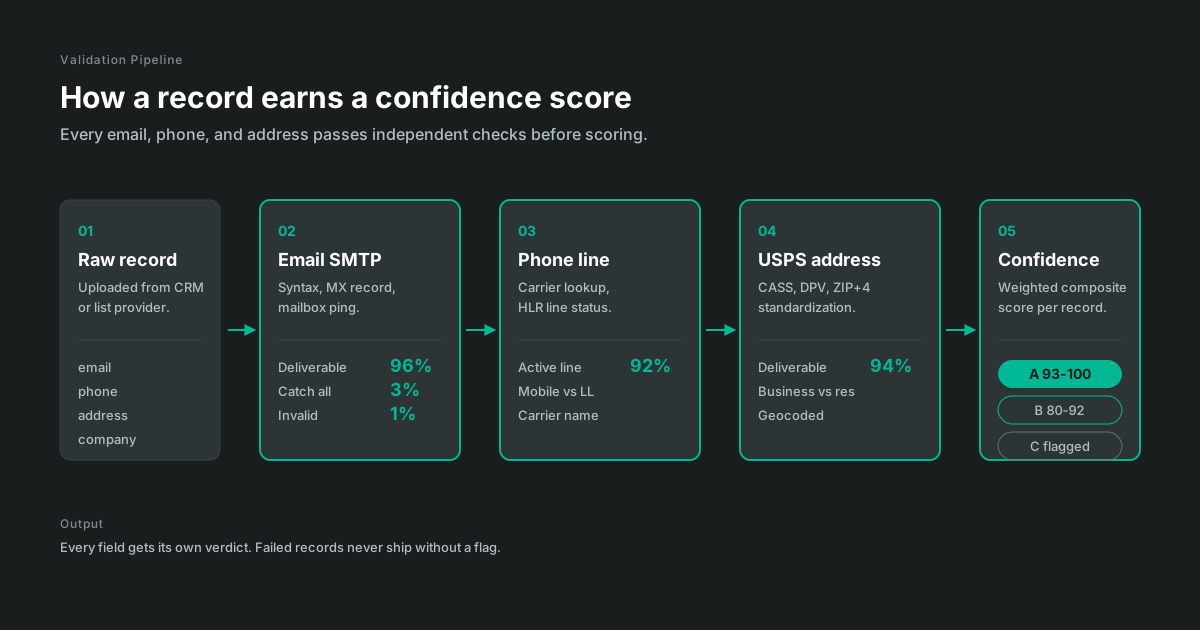
When you're selling to healthcare providers, you need more than a name and phone number. You need to know they're credentialed. That their NPI is active. That they're practicing at the location you have on file.
The NPI Registry, maintained by CMS through the National Plan and Provider Enumeration System (NPPES), is the authoritative source for provider identifiers. But checking it manually is tedious. One provider at a time, copying and pasting, hoping you don't make mistakes.
We validate your entire database against the NPI Registry automatically. Each provider checked, each identifier verified, each discrepancy flagged.
What Makes an NPI Valid?
An NPI is a 10-digit number. The first nine digits identify the provider and the tenth is a check digit computed with the Luhn algorithm, the same formula used for credit card numbers, applied with the standard 80840 health industry prefix. That means a lot of typos fail a pure math check before you ever query the registry: transposed digits, a dropped digit, a fat-fingered entry.
Passing the Luhn check proves only that the number is well-formed. It cannot establish that the NPI was issued, belongs to the person in your row, or remains active. Real validation has three layers:
- Format check. Ten digits, valid check digit. Catches data entry errors instantly.
- Registry lookup. Does this NPI exist in NPPES, and is it active or deactivated?
- Identity match. Does the registry record's name, specialty, and location agree with your database?
Most "NPI validation" tools stop at layer one. The expensive mistakes live in layers two and three.
How NPI Enumeration Works
The CMS NPI files documentation distinguishes individual providers from organizations. Registry status identifies the enumerated provider or entity, while current workplace and affiliation require separate checks.
Organization records can represent group practices, hospitals, clinics, pharmacies, or eligible subparts. Keep the registry's entity type with the record so an organizational billing identity is not mistaken for an individual clinician.
For targeting, the distinction matters. Bill-to and sell-to are different questions. Label individual and organization records so outreach is routed to the relevant clinical or administrative role.
What We Validate
- NPI status. Is this NPI currently active? Deactivated NPIs mean the provider isn't practicing.
- Provider name matching. Does the name in your database match the NPI Registry? Catch data entry errors and outdated records.
- Specialty verification. Is this provider in the specialty you're targeting? Taxonomy codes are self-reported, so we treat them as a strong signal and cross-check against practice data.
- Practice location. Is the provider at the address you have? NPI Registry shows primary and secondary practice locations.
- Entity type. Individual provider (Type 1) or organization (Type 2)? Different entity types need different approaches.
- Credential verification. MD, DO, NP, PA? Verify the credential matches what's in your database.
Why Do NPIs Get Deactivated?
Providers or their estates can deactivate an NPI through NPPES, and CMS records a reason code with each one: death, disbandment of an organization, fraud, or other. Retirement and license surrender show up here too.
Two things about deactivation trip up sales teams. First, there's no expiration date on an NPI, so nothing in your CRM ages out on its own. A record validated in 2023 can point at a deactivated NPI today and look identical. Second, NPPES strips most data from deactivated records in its public downloads, so a deactivated provider doesn't just get flagged, they effectively vanish from the file. If your match process silently drops non-matches, deactivations hide inside your "no match" pile.
We report deactivations explicitly, separate from records that directly failed to match.
Common Issues We Catch
Deactivated NPIs. Provider retired, lost license, or stopped practicing. NPI was deactivated but your database doesn't know.
Practice changes. Provider moved to a different practice. NPI is still active, but the address is wrong.
Specialty mismatches. Your database says cardiologist, NPI Registry says family medicine. Wrong target.
Name discrepancies. Database has "Dr. Smith", NPI has "Jane Smith-Jones". Same person, but automation doesn't match them.
Wrong entity type. You have a practice NPI but you're trying to reach an individual. Different outreach needed.
What You Get
You receive each submitted record with its NPI match, taxonomy, status, source, and any conflict that needs review.
Validation status. Verified, unverified, or discrepancy found. Each provider categorized.
NPI Registry data. Current information from the registry: name, specialty, practice locations, credentials.
Discrepancy flags. Specific issues identified: wrong specialty, wrong address, name mismatch.
Recommendations. Which records to keep, which to update, which to remove.
How It Works
Step 1: Send us your provider data. Name, NPI (if you have it), address, specialty. Whatever you have.
Step 2: We match against the NPI Registry. Each provider checked against the official federal database.
Step 3: Discrepancies flagged. Issues identified with specific details on what's wrong.
Step 4: Results delivered. Validated file with status on each provider, plus summary report.
How Fresh Is the Registry Data?
CMS publishes NPPES downloadable files as full replacement and incremental packages, and provides a registry interface for individual lookups. Record which source and publication date each validation run used.
Treat the NPI Registry extract as dated evidence about the returned registry fields. Record the source date and values, then corroborate location or affiliation fields against current practice and state sources when those fields drive the decision.
Pricing
Verum provides a written, scope-specific charge and schedule after reviewing the record count, requested checks, source dates, exception rules, corroboration needs, and delivery format.
Common Questions
What if I don't have NPIs in my database?
We can match providers by name and address to find their NPIs.
How current is the NPI Registry data?
We use the most current NPPES data available, typically updated weekly. For real-time validation needs, we can check directly against the live registry.
Can you validate organization NPIs?
Yes. We run the same core registry checks for organization and individual records, then review practice and affiliation fields appropriate to the entity.
What about providers with multiple NPIs?
We validate the NPI you provide. If you need to find NPIs associated with a provider, that's a separate lookup we can do.
Can a provider have both a Type 1 and a Type 2 NPI?
A provider and an incorporated practice can appear as separate individual and organization records. We preserve the entity type so the two roles are not conflated.
Does an NPI expire if a provider stops billing?
No. NPIs have no expiration date and stay active until someone deactivates them through NPPES. An active NPI alone cannot establish that a provider is still practicing, so address and practice checks supplement registry status.
Sell to Real Providers
Healthcare sales is hard enough without chasing providers who aren't credentialed, aren't practicing, or aren't where you think they are. Validate your database and focus on real opportunities.
Related: Healthcare Data Enrichment | Practice Status Validation | Healthcare Solutions